




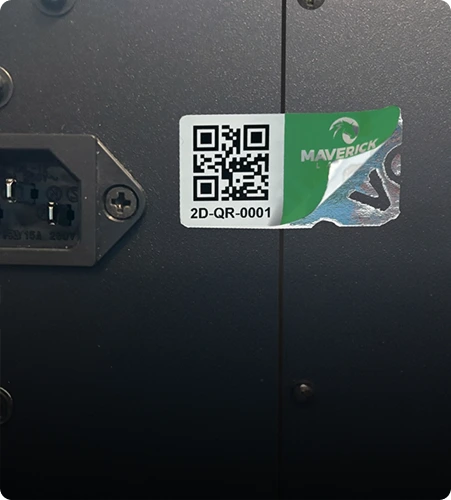
Asset tags help organizations identify, track, and manage equipment throughout its working life. These labels may contain barcodes, QR codes, serial references, or internal inventory numbers that connect physical devices to an organization’s asset management system. However, when businesses retire, resell, redeploy, or recycle IT equipment, they may need to remove or update these identifiers to protect internal records and prepare devices for their next destination.
A professional asset tag removal service helps organizations manage this transition through a structured process. It involves more than peeling labels off equipment. Teams must identify the correct assets, verify inventory records, remove tags without damaging devices, and update tracking information to maintain accurate records.
At E-XPIRE, we understand that asset identification is an important part of secure IT asset disposition. A well-managed removal process helps businesses prepare equipment for reuse, remarketing, redeployment, or recycling while maintaining better control over their IT inventory.
Why Asset Tag Removal Matters in IT Asset Management
Asset tags connect physical equipment to internal records. They help IT and asset management teams identify devices, check ownership, monitor locations, and maintain visibility across departments or facilities.
When equipment reaches the end of its assigned lifecycle, those identifiers may no longer serve the original purpose. Leaving old tags in place can create confusion, expose internal asset references, or make equipment appear to belong to an organization after ownership or control has changed.
Professional tag removal can help businesses:
- Protect internal identification details: Remove labels containing company names, inventory references, barcodes, or other internal identifiers.
- Prepare equipment for resale: Make devices ready for remarketing without outdated ownership labels.
- Support redeployment: Prevent confusion between previous and current asset records when equipment moves between departments or locations.
- Improve inventory accuracy: Ensure retired equipment no longer appears as active in the organization’s asset register.
- Prepare devices for recycling: Remove obsolete identification labels before equipment enters its next processing stage.
The importance of accurate records becomes clearer when organizations manage equipment at scale. A 2026 Government Accountability Office report on federal property disposal found that federal agencies disposed of more than 48 million unneeded personal property items through the General Services Administration’s system between July 2023 and the end of fiscal year 2025. This demonstrates the scale of asset tracking and disposition activity that large organizations may need to manage.
1. Initial Equipment Assessment and Project Planning
A professional asset tag removal process begins with an assessment of the equipment and the organization’s requirements. Before removing any label, the processing team needs to understand which devices are involved, where they are located, and how the business wants to manage their identifiers.
Identify Equipment Categories
The equipment list may include:
- Desktop computers and laptops
- Servers and networking devices
- Monitors and display equipment
- Printers and scanners
- Storage devices and peripherals
- Mobile phones and tablets
- Other business-owned electronic equipment
Different devices have different surfaces, finishes, and label placements. Reviewing these details helps determine suitable removal methods.
Establish Removal Requirements
Not every asset tag needs the same treatment. Some organizations may want all visible company labels removed, while others may need additional identification materials retained for reconciliation or audit purposes.
The business should clarify:
- Which tags and labels need removal.
- Whether barcodes, QR codes, and serial references require separate treatment.
- Whether manufacturer labels or regulatory markings must remain.
- Whether devices are intended for resale, reuse, redeployment, or recycling.
- What documentation the processing team should provide.
Clear instructions help prevent accidental removal of information that the organization still needs.
2. Inventory Verification Before Tag Removal
Before technicians begin removing labels, they should verify the equipment against the supplied asset inventory. This step helps ensure that the correct devices enter the process and that businesses retain a record of the equipment being handled.
A typical verification process includes:
Match Physical Devices With Asset Records
Technicians compare available identifiers, such as asset numbers, serial numbers, equipment descriptions, and model details, with the organization’s inventory list.
Record Missing or Damaged Tags
Some equipment may arrive with labels that are missing, damaged, faded, or unreadable. The team should record these exceptions rather than assigning an assumed identity.
Identify Duplicate or Conflicting References
Businesses may have used different inventory systems over time. A device could carry an old barcode alongside a newer company asset label. Identifying these differences before removal helps prevent mismatches during record updates.
Confirm the Removal List
Once the equipment matches the approved inventory, the team can establish which labels to remove and which identifiers to retain.
This verification stage is particularly useful for enterprises managing large batches of IT equipment. It reduces the risk of removing the wrong identifier or losing the connection between physical devices and internal records.
3. Document Existing Asset Information
Removing a tag without preserving the relevant asset information can create problems later. Once a label disappears, the business may lose an easy way to connect the physical device with its previous inventory record.
For this reason, documentation should take place before the removal work begins.
The information recorded may include:
- Original asset tag or inventory number.
- Equipment manufacturer and model.
- Serial number, where available.
- Device category and condition.
- Current department or assigned location.
- Removal status and processing date.
- Any exceptions identified during verification.
Photographs may also help document tag placement and the device’s condition before processing, particularly when organizations need a visual record.
The objective is to preserve the information needed for reconciliation while removing outdated physical identifiers. This allows IT teams to maintain historical records even after the original labels have been removed.
4. Professional Asset Tag Removal Techniques
Once the team verifies and documents the equipment, technicians can begin removing the specified labels. The appropriate technique depends on the label material, adhesive strength, device surface, and condition of the equipment.
Assess the Label and Surface
Asset tags may use paper, vinyl, polyester, or other materials. They may also have permanent adhesives designed to resist tampering or environmental exposure.
Technicians should first identify the label type and check the surface beneath it. Metal cases, plastic housings, coated panels, and textured surfaces may require different handling approaches.
Remove Labels Carefully
The removal method should minimize the risk of scratching, cracking, discoloring, or otherwise damaging the equipment. Technicians may use controlled heat, suitable tools, or approved adhesive-removal products when appropriate for the device’s material.
They should avoid aggressive scraping or chemicals that could affect plastic housings, screens, finishes, or sensitive components.
Address Adhesive Residue
Some labels leave adhesive behind even after the main material comes away. Technicians may need to clean the surface using a compatible method that does not damage the equipment.
Check for Additional Identification Labels
A device may carry more than one company identifier. Technicians should check approved removal areas for secondary asset stickers, barcode labels, or ownership markings that the business has requested them to remove.
Throughout this stage, the focus should remain on removing the correct labels while preserving the physical condition of the equipment.
5. Update Inventory Records and Maintain Traceability
After physical tag removal, organizations need to update their asset management records. This ensures that the business does not continue treating retired equipment as active inventory under an identifier that no longer appears on the device.
The update process should connect the original asset record with the equipment’s next disposition status.
For example:
| Record field | Information to maintain |
| Original asset ID | Identifier used before tag removal |
| Serial number | Manufacturer-assigned device reference |
| Removal status | Completed, pending, or exception |
| Processing date | Date the tag was removed |
| New asset reference | Updated identifier, if applicable |
| Disposition status | Redeployed, remarketed, recycled, or retired |
This information can help asset managers reconcile equipment records and maintain an audit trail.
The value of accurate disposition records extends beyond physical label removal. The same GAO report found that only about 9% of more than 48 million disposed federal personal property items were reused, through transfers, donations, or sales. This finding from the GAO’s federal property disposal analysis illustrates why organizations should preserve accurate identification and condition records when assessing equipment for future use.
At E-XPIRE, we consider traceability an important part of responsible IT asset processing. Removing an identifier should not mean losing the information needed to account for the device.
6. Quality Checks After Removal
A final inspection helps confirm that the work meets the organization’s requirements. Technicians should review both the physical condition of the equipment and the completion of the associated records.
A quality check may include:
- Confirming that all specified asset tags have been removed.
- Checking for remaining adhesive residue.
- Inspecting the device for scratches or surface damage.
- Verifying that manufacturer and required regulatory labels remain intact.
- Matching completed work against the approved inventory list.
- Recording devices with missing tags or other exceptions.
- Confirming that inventory records reflect the completed removal.
For larger projects, businesses may also request a completion report that summarizes the number of devices processed and identifies any exceptions.
These checks help organizations avoid incomplete work and make it easier to prepare equipment for its next stage.
7. Prepare Equipment for Its Next Lifecycle Stage
Asset tag removal often forms part of a wider IT asset disposition workflow. Once the organization has verified the equipment, documented its identifiers, and completed the requested removal, it can prepare devices for their next destination.
Redeployment
Equipment that remains suitable for business use may move to another department, office, or operational environment. The organization can assign new internal identifiers where necessary and update the asset register to reflect the change.
Remarketing or Resale
Devices intended for resale may need outdated company labels removed to prepare them for a new owner. Businesses should also address data sanitization, condition assessment, and other preparation requirements before remarketing.
Recycling
Equipment that has reached the end of its useful life may proceed to responsible electronics recycling. Removing obsolete identification labels can form part of the wider preparation process, alongside data destruction and equipment assessment.
Businesses planning these activities can explore E-XPIRE’s asset tag removal solutions as part of a structured approach to preparing retired IT equipment.
How E-XPIRE Supports Professional Asset Tag Removal
At E-XPIRE, we help organizations manage the preparation and disposition of retired IT equipment through services that address asset identification, secure handling, and responsible processing.
Our asset tag removal capabilities support businesses that need to remove outdated ownership labels and identifiers from equipment before its next lifecycle stage. We understand that the work must account for accurate inventory information and the physical condition of devices.
Our broader IT asset disposition services include secure data destruction, electronics recycling, asset remarketing, asset redeployment, and logistics support. By considering these activities together, we help organizations manage equipment retirement through a more coordinated process.
Whether your organization is preparing a small equipment batch or managing a larger IT refresh, the process should preserve the information needed for asset reconciliation while preparing devices for their intended destination.
Make Asset Tag Removal Part of Your IT Asset Management Process
Professional asset tag removal involves several connected steps, from equipment assessment and inventory verification to careful label removal, record updates, and final quality checks. Each stage helps organizations maintain control over retired equipment while reducing confusion around ownership and identification.
When businesses treat tag removal as part of their wider IT asset management process, they can prepare equipment more effectively for redeployment, remarketing, or recycling. Maintaining accurate records also helps preserve traceability after physical labels no longer appear on devices.
E-XPIRE supports businesses with asset tag removal and IT asset disposition services designed to help manage equipment throughout its retirement process. If your organization is planning an IT refresh or needs support preparing equipment for its next destination, contact E-XPIRE to discuss your requirements.
Frequently Asked Questions
1. What is a professional asset tag removal service?
An asset tag removal service involves identifying business equipment, verifying its inventory details, removing designated company labels, and checking the results. The process helps prepare devices for redeployment, remarketing, resale, or recycling while preserving the information needed for asset records.
2. Why should businesses remove asset tags before reselling or recycling IT equipment?
Old asset tags may contain company names, internal inventory numbers, barcodes, or other ownership references. Removing them helps prevent confusion about previous ownership and prepares equipment for its next destination. Businesses should preserve relevant inventory information before removing the physical labels.
3. Can asset tags be removed without damaging equipment?
Yes, technicians can use suitable removal methods based on the label material, adhesive, and equipment surface. A professional process aims to remove labels and residue without scratching or damaging the device. The method should account for sensitive finishes and manufacturer markings.
4. Should businesses update their asset register after tag removal?
Yes. Organizations should preserve the original asset identifier, record the removal status, and update the equipment’s current disposition. This helps maintain an audit trail and prevents retired devices from appearing as active assets under outdated identification numbers.
5. Is IT asset tag removal part of the IT asset disposition process?
Yes. IT asset tag removal can support the preparation stage of IT asset disposition. Businesses may arrange it alongside inventory verification, data sanitization, equipment assessment, remarketing, redeployment, or electronics recycling, depending on the intended outcome for each device.